Aweber Defines Email Marketing

aweber-stats

I love my Aweber account. Ever since I switched over to Aweber from 1ShoppingCart and GetResponse autoresponders, I’ve seen the service improve both in terms of usability (a lot of AJAX-based features), deliverability and most importantly in terms of reporting.

It gives me total control of my mailing list and allows me to do things my friends on GetResponse seem to have a hard time doing; stuff like sending out emails based on country (or even city), RSS broadcasting features, integration with FeedBurner and split-testing emails.

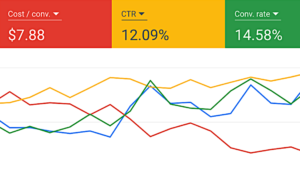
From the screenshot above you can see how just 4 different statistics can give you a complete picture of my mailing list health:

  • Bounces - How many emails didn’t reach the subscriber’s inbox, probably due to fake email addresses, space limitations, or other reasons.
  • Complaints - How many people report the email as SPAM. I hate those guys.
  • Opens - How many people who received your email, actually opens them
  • Clicks - How many people clicked on links in your email message (I found using HTML works best for this)

In fact the only thing I regret about Aweber is that I didn’t use it earlier. When I made the switch I had about 500+ subscribers in GetResponse and 8,000+ in 1ShoppingCart. I estimate that only 25% of these made it into my Aweber account when I imported their names. The rest will probably never be recovered.

As per standard procedure, Aweber will send a opt-in confirmation email to everyone you add using the “import” feature. GetResponse and 1ShoppingCart, as well as any other reputable email marketing service, have similar terms as they seek to avoid their service being abused by spammers.

This is why I always tell every one I coach to get the best autoresponder service when getting started, and stick to it. If you try to cut costs, you end up losing out in the long run when you switch services. If you cannot afford Aweber, then at least use GetResponse.

A good email marketing management service is perhaps THE most important investment you can make to ensure success in your home based Internet business, so don’t shoot yourself in the foot by succumbing to the illusion of false economics.

Share This Post

Packaging; Makeover Your Older Sites For New Sales

web-graphcis-monthly

Although I graduated with a degree in “Multimedia Marketing”, perhaps the only thing I remember from college are The 4Ps of Marketing namely:

  1. Product
  2. Price
  3. Packaging
  4. Promotion

(A friend told me that they added a fifth P to it, for Pray.)

Sometimes a product gets old and jaded in a marketplace, and instead of going about creating new products you can simply revive the old one by tweaking a few of the Ps.

Now as a student of marketing, I understand very well the effect of Packaging in the overall process. Even if your product is the best in the world, it has very little perceived value if the packaging sucks. A mediocre product with excellent packaging on the other hand can do pretty well in the marketplace. A truly great product with excellent packaging is the ultimate, and not many companies (except Apple) can get it right.

So if you have an older site and you want to jazz it up and get more sales, here’s what you can do:

  1. Make updates and add a “Version 2″ or “Second Edition” to visible areas on the site, including the banner of your site and the product e-cover
  2. Hire a good web designer to make your theme more “current”, for example I got Design Guru Ryan to give my Web Graphics Monthly site a more modern look
  3. Update image and outdated screenshots on your sales page (hint: next time take screenshots without actual dates if possible)
  4. Create new marketing graphics and banners

With these 4 simple steps, a product or website that used to be scorching hot can be revived and made more appealing.

Think how many times TV manufacturers, car manufacturers, book publishers and landlords repackage the same stuff (or add on a little to it) to make it seem like a new product altogether. If it works for them, it can work for your home based business as well..

Share This Post

Marketing Without A Mission Statement?

Sometimes common sense is the hardest thing to grasp, when you’re so deep into “savvy marketing” and “Web 2.0″. Riding the wave of new marketing technology, we sometimes forget to implement basic marketing concepts such as a “mission statement”.

I’m not talking about the type of stuff you’re forced to memorize at work, the ones that go like “We strive to achieve excellence and serve the regional markets to provide better value-added services and increase our shareholder’s value..”

Those type of statements are crap, simple because (1) they are not memorable (2) they mean nothing.

If you’re trying to get opt-in leads from your e-mail marketing campaign, you need a “mission statement”. My definition; a simple statement of an achievable goal; of what someone should expect to get from surrendering their name and email address to you.

For example:

  1. Master the guitar in 30 days
  2. Lose 30 pounds in 2 weeks
  3. Quit your day job in 14 weeks

I was looking at my opt-in boxes for Internet Millionaires Club and I realized that it needs a stronger “mission statement”. Something that would spark the imagination (and curiosity) of potential subscribers.

So here’s the mission statement I created:

millionairemission-big 

You may or may not agree with me, and I may or may not have hit the nail on its head. But don’t you agree that you need to set yourself apart from everyone else in your market?

Share This Post

Clickbank Announces Direct Deposit

clickbank-direct-deposit

If you have a Clickbank account, chances are you’re getting paid by check every pay period (2 weeks). If your payments are consistent, ie you have received at least 3 consecutive payments, then you qualify to apply for Clickbank’s direct deposit feature.

ClickBank is pleased to offer International Direct Deposit (XACH) for direct deposit of your ClickBank account payments into certain international bank accounts, at no extra charge.

This will help me save loads of time waiting for checks to appear in my mailbox, and trying to cash in the checks in time to pay other expenses and bills. If you live outside any of the countries where Direct Deposit is allowed (Australia, Austria, Belgium, Canada, France, Germany, Ireland, Mexico, The Netherlands, New Zealand, Spain, Switzerland, the United Kingdom, and the United States), then you can get a non-resident US bank account as an intermediary bank.

Share This Post

Blog Less, Make More Money?

If you noticed, for the past few months I’m averaging about 1 post a month, and in fact I didn’t update GobalaKrishnan.com at all in June. Neither did I write a lot for ProfitBlogger.com (formerly know as EasyWordpress.com). So what exactly happened to me?

profitblogger

Was I facing a really tough writer’s block, or did I just give up on updating my personal blog altogether?

A little bit of both actually. When I first started blogging, this was the only blog I had, and I posted everything here. In fact this blog is responsible for most of my life-long customers, subscribers and fans. However along the way I started a blog about how to make money blogging, one on music marketing, and another on MLM tips, and a while later yet another one about Internet business in Malaysia.

After juggling all blogs (with the help of hired bloggers), I started becoming a slave to my own business working 9am to 11pm and yet my income hardly grew. A classic case of stretching yourself too thin; biting off more than you can chew; or whatever you call it.

I lost my direction for GobalaKrishnan.com - I didn’t know what to write here since now I have all those other blogs where I can publish my content to. So I stopped blogging here and all I could do was to publish one or two rather lame post just for the sake of keeping it updated.

But I wasn’t being lazy.

In fact, I was working harder than ever before. The only thing that changed is that I realized with the time I spent on blogging, I could actually create a lot more of my own product which generated much more income. In the last three months I created Super Affiliate Blogger, wrote Blog Paycheck and even managed to update my first successful product you probably already know as WordPress Adsense System.

clickbank-increaseAs a result, in a two week period in May / June I made $10,882.33 from sales of my own products alone, thanks to the great response to Super Affiliate Blogger. Then I followed up with Blog Paycheck less than 30 days later and that too was a hit, bringing my income level for the next month to more than $8,500.00 from the sales of my own products. This means that by introducing those two products I almost tripled my income.

The funny thing is, since August 2006 the only product I had that generated daily sales was WordPress Adsense System and I never tried to even create a follow-up product to that. Instead I spent most of my time blogging, blogging, and blogging even more. A lot of blog post, and lot of “Thank you for the wonderful resource, you’re such a nice guy..”. But not a lot of money.

Which got me into thinking, is it really worthwhile to write 2-3 blog posts a day like some of the big name bloggers do? Do I really need to be a content-generating machine just to keep up? Do I need to give away so much free information, when it’s proven that I can charge for the information, have more time for myself, and yet keep everyone happy?

The answer is: it depends.

I now realize the difference between “having a blog” and “blogging” - at least in my own definition of those terms. Having a blog is good - after all blogs are still one of the best ways to get traffic and search engine rankings. But to be “blogging” day in and day out is not my cup of tea, especially when it becomes more of a chose than a pleasure.

I now have a new strategy to create more sites, make more money, yet spend less time with day-to-day blogging.

What is it? You’ll need to subscribe to my blog about blogging to find out. I’ll be writing about that soon.

This blog will focus more on strategies, experiences and insights on creating products, copywriting, list building, and direct response marketing. That’s what I’m really good at - selling stuff :)

A lot of work to do, but I’m going to take my time doing it. It’s more fun that way.

Share This Post

Aweber Introduces FeedBurner-Like Chicklet

aweber-chicklet

If you have an Aweber account to handle your email marketing, you’ll be glad to know that Aweber now has their own “Chicklet” to show off the amount of subscribers you have. Very similar in appearance to the FeedBurner chicklet we’re all used to seeing, plus you can customize the colors too.

Share This Post

Super Affiliate Blogger Is Launched

WSA-eCoverMedium After months of preparation, my WordPress Affiliate Marketing guide is finally out. While I initially called this product “WordPress Super Affiliate” I decided to change it’s name to “Super Affiliate Blogger” for mass appeal. 

So what is it exactly?

Super Affiliate Blogger is more than just an e-book; it’s a complete system for affiliate marketing with blogs. It comes with a special link tracking system, special list building system and most importantly the customized Super Affiliate Pro WordPress themes. The theme is the most important factor here, as without this theme you will not be able to follow the instructions in the guide.

Unlike most WordPress themes that only have a single layout, the Super Affiliate Pro WordPress theme has several templates you can use for different purposes. One important template is the “Landing Pages” which is critical if you plan to use PPC (Pay-Per-Click) advertising to sell affiliate products on the Internet, as well as build a huge list.

Yes you can depend 100% on search engine traffic but there are thousands of blogs out there all using the same “SEO and free traffic” strategy. Besides, SEO takes time to work.

PPC on the other hand is instant, and with Google AdWords you can start getting traffic to your blogs in 15 minutes. Of course you pay for each click that you get, but with a carefully crafted landing page, careful keyword selection and good pre-selling content, it is more than possible to start making money very, very fast.

More info: WordPress Affiliate Marketing Guide

Share This Post

750 Traffic Tactics with Private Label Rights

Edmund Loh has just done all of us a big favor.

As you may already know, traffic is the number one thing almost every Internet marketer wants to know about.

If you’re selling a product related to Internet marketing, web design, blogging etc than you should definitely get Edmund’s 750 Traffic Tactics PLR package. (Update: All sold out)

The first thing you should do, is to cut up the massive package into parts and create your own product based on a specific theme. For example, traffic tips for bloggers, traffic tips for forum owners, SEO tips for webmasters, social media traffic, etc.

That way you can create more value out of your new product and position it uniquely on the market.

Share This Post

Create an Awesome PopUp For Your Website

This is my the first software product I have developed and marketed, and you can get it for just $10.00.

lightbox-popup

As you can see from the screenshot above, Awesome Popup adds a very cool, lightbox-style popup to your website. What happens is that once the popup loads, you page will be frozen and covered by a transparent black background, with the pop-up on top. This type of popup isn’t annoying (unless you make it annoying) and cannot be blocked by browsers.

(Popup effect very similar to what happens when you click on the image above)

You can use it to greatly increase your marketing results, to display an offer or urgent news, and much more. Visit www.AwesomePopup.com - it comes with Master Resell Rights too.

Share This Post

Turn Off Directory Browsing to Protect Your Web Content

In my post about the Top 10 Silly Mistakes, a lot of readers were surprised about one particular seemingly “common” mistake, which is not turning off directory browsing for your folders.

This is really simple to do, and will avoid your web content from being stolen as people will not be able to browse the contents of your folder by typing it into the browser. If you type in www.yoursite.com/wp-content/plugins and directory browsing is not turned off for your web site, you can see the content of the entire folder, like this:

directory-browsing

This exposes your website to thieves and hackers, making their lives much easier and serving your files to them on a silver platter.

To turn off directory browsing, simple log into your Cpanel account and look for the “Index Manager” icon, click on it.

directory-browsing-2

This will take you to another page where you can turn off directory browsing for individual folders, or for the entire site. Usually, to turn off indexing for the entire site you need to click on the root folder, which is public_html

directory-browsing-3

Finally, change the settings from “Default System Setting” to “No Indexing”. Now, your folders should be protected from peeping toms forever.

directory-browsing-4

Running an online business involves learning how to secure your website, intellectual property, and business processes from people that mean to do you harm, and turning off directory browsing is the easiest (but most overlooked) way to get started in the right path.

Share This Post